
AeroMount
AeroMount is AeroFTP's persistent mount registry (also called the Mount Manager). Save any saved server profile as a reusable mount configuration, mount and unmount with a single click, open the mount in your OS file manager, and optionally have AeroFTP attach the mount automatically on system login.
AeroMount is reachable from three places:
- File menu -> AeroMount...
- My Servers toolbar (AeroMount button)
- The address bar of any connected remote, via the mount glyph next to the path
AeroMount wraps
aeroftp-cli mount(FUSE on Linux / macOS, WebDAV bridge on Windows) andaeroftp-cli daemonfor autostart. Every mount you save in the GUI works identically from the CLI; no GUI is required to attach a mount.
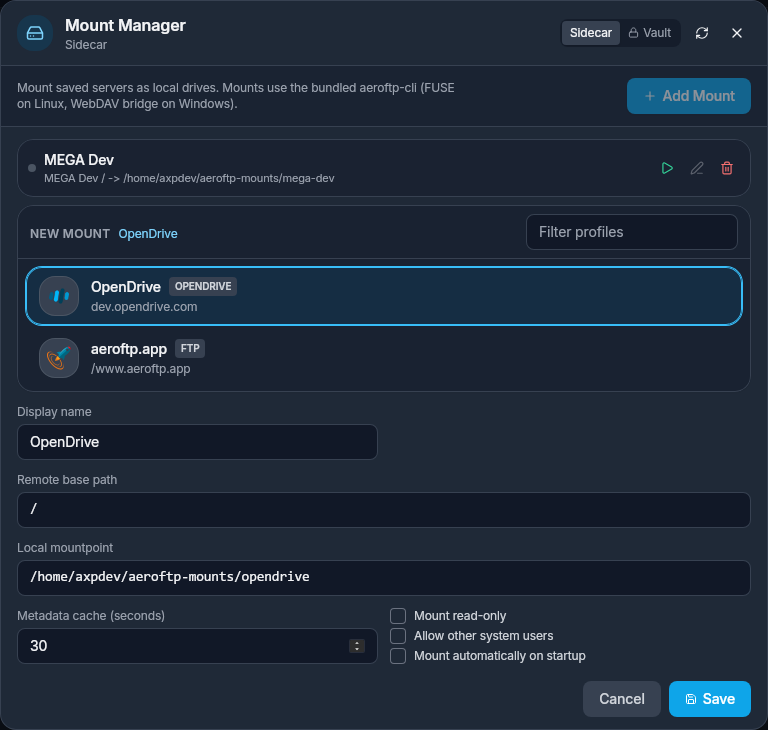
The header carries the Sidecar / Vault toggle that decides where the registry lives, and a refresh button that re-reads the config from disk. Saved mounts (here, MEGA Dev) appear as one-row entries with inline Mount, Edit, and Delete actions. The lower NEW MOUNT card is the inline editor: pick a saved profile (here, OpenDrive is selected from the filterable profile list), set a display name, the remote base path, the local mountpoint, the metadata cache TTL, and the three flags Mount read-only, Allow other system users, and Mount automatically on startup.
Saved Mount Configurations
Each row in AeroMount represents a complete mount configuration that survives across launches. Click + Add Mount to open the inline editor; click the pencil icon on any existing row to edit it.
| Field in the editor | Purpose |
|---|---|
| Profile picker | Filterable list of saved server profiles (any of the 7 transport protocols + 20+ native provider integrations). Each row shows the profile name, protocol badge (e.g. OPENDRIVE, FTP), and saved host or path. |
| Display name | Human-readable label for this mount (defaults to the profile name; rename freely). |
| Remote base path | Subtree of the remote that becomes the root of the mount. / mounts the entire account. |
| Local mountpoint | Local directory (Linux / macOS) or a drive letter (Windows). The default is ~/aeroftp-mounts/<slug>. |
| Metadata cache (seconds) | Directory-listing cache TTL. Default 30; raise it for higher latency providers, lower it for collaborative folders that change often. |
| Mount read-only | Mount the share as read-only at the FUSE level. |
| Allow other system users | Linux only -> add allow_other so other system users can read the mount. |
| Mount automatically on startup | When enabled, the mount is attached on system login (see Phase B). |
Per-row actions on saved mounts: Mount (green play), Edit (pencil), Delete (red trash). When a mount is active the play button switches to a stop button, and an Open in file manager glyph appears.
On Windows, an inline Pick free drive letter helper scans the system for the first unused drive letter so the Local mountpoint field always has a working default.
Where Mount Configs Are Stored
The dialog header carries a single Sidecar / Vault toggle that decides where the mount registry lives. The active mode is shown right under the AeroMount title (in the screenshot above, Sidecar):
- Sidecar JSON (default, daemon-friendly) -> a plaintext JSON file alongside the user config. This is the right choice when
aeroftp-cli daemonruns as a system or user service: the daemon does not need vault unlock to read the mount list. - Encrypted vault -> the registry is stored inside the AeroFTP vault and is decrypted on demand whenever the dialog is opened.
The toggle round-trips both ways. Switching from sidecar to vault re-encrypts the existing entries and removes the plaintext file; the inverse path emits a fresh sidecar from the decrypted entries. The refresh button next to the toggle re-reads the active store from disk so changes made by the CLI or the daemon outside of the GUI are picked up without closing the dialog.
Mount configs themselves never carry secrets. The mount only stores the profile name + remote path + mountpoint metadata. Authentication (passwords, OAuth tokens, SSH keys, API keys) always flows through the encrypted vault via
aeroftp-cli --profile <name>. Even the sidecar JSON is safe to back up: it cannot connect to anything without the matching vault entry.
Phase B - Autostart
When Auto-start is enabled on a mount, AeroFTP installs the right OS-level hook so the mount is attached on every system login:
- Linux -> a
systemd --userunit named after the mount, enabled withsystemctl --user enable --now aeroftp-mount-<id>.service. The unit runsaeroftp-cli mount --profile <name>with the mount's stored options. - Windows -> a Task Scheduler entry with the At log on trigger, running
aeroftp-cli.exe mountin the user session. The task is registered under the AeroFTP folder so it shows up in Task Scheduler grouped with the rest of the app's tasks. - macOS -> autostart is not yet wired to a
launchdagent in 3.7.1; mounts can still be triggered from the GUI or fromaeroftp-climanually until LaunchAgent support lands in a future release.
Toggling Auto-start off removes the corresponding unit / task. The user-mode placement keeps the autostart entry isolated from system-level services and avoids any need for sudo / Administrator elevation during install.
Phase C - Open Mount in File Manager
The Open in file manager action collapses three steps into one click:
- If the profile already has a saved mount, it is reused; otherwise AeroFTP synthesises a default mount config (sensible mountpoint under the user home on Linux / macOS, first free drive letter on Windows) and saves it to the registry on the spot.
- The mount is attached if it is not already running.
- AeroFTP waits 800 ms for the FUSE / WebDAV layer to settle, then hands off to the OS default file manager (
xdg-open, Finder, Explorer).
The 800 ms grace window matters: opening the file manager too eagerly leaves it pointing at an empty directory because the mount has not finished negotiating its first directory listing yet. The same path is taken from the address bar's mount glyph on a connected remote, so a single click takes you from "browsing in AeroFTP" to "the mount is live and your OS file manager is open inside it".
Credential Flow
Mounts inherit their credentials from the GUI's vault automatically:
AeroMount row
   |
   v
aeroftp-cli mount --profile <name> ...
   |
   v
CredentialStore (vault.db) -> resolved at mount time, never written to disk in plaintext
Because the CLI shares the same Rust backend as the GUI, opening a mount from AeroMount and starting the same mount from a terminal produce byte-for-byte identical processes. There is no second credential store; there is no GUI-only auth path.
See credential isolation for the vault model that makes this work without leaking secrets into the mount registry, the systemd unit, or the Task Scheduler entry.
Compatibility
| Platform | Backend | Mount surface |
|---|---|---|
| Linux | FUSE 3 | /mnt/..., any user-writable directory |
| macOS | macFUSE | /Volumes/..., any user-writable directory |
| Windows | WebDAV bridge | Drive letter (Z:, Y:, etc.) or UNC path |
All supported integrations that expose a hierarchical filesystem can be mounted (FTP, FTPS, SFTP, WebDAV, S3, Azure Blob, plus 20+ native providers). The exceptions are GitHub and Drime Cloud, which are non-hierarchical by design and therefore not exposed in the mount picker.
Troubleshooting
Mountpoint busy on Linux -> a previous run did not unmount cleanly. Run fusermount -u <mountpoint> (or umount -l <mountpoint> if FUSE is wedged) and try again.
Drive letter already taken on Windows -> use the Pick free drive letter helper or pick a letter manually. AeroMount refuses to clobber an existing assignment.
Auto-start unit does not fire on Linux -> confirm systemctl --user is-enabled aeroftp-mount-<id>.service. Lingering must be enabled (loginctl enable-linger <user>) for the mount to come up before login on headless boxes.
Mount looks empty in the file manager -> the 800 ms settle window is sometimes not enough on slow networks. Wait a moment and refresh; the mount is attached, the listing is just not paged in yet.
See Also
- CLI:
mount- the underlying command, runnable on its own - CLI:
daemon- the persistent service that hosts auto-started mounts - AeroCloud - background sync alternative when you do not need a live filesystem
- Credential isolation - how the vault keeps mount configs free of secrets